 Switch
 76%
76%
 59%
59%

Only the login changes
Pick an account and Switch replaces only that tool's login file. Settings, extensions, and history stay where they are. Each tool keeps its own default.
Switch keeps every login for Codex, Claude Code, Cursor, and about 90 more tools ready in your menu bar, and shows how much of each limit is left.

More than a switch
Pick an account and Switch replaces only that tool's login file. Settings, extensions, and history stay where they are. Each tool keeps its own default.
Session and weekly windows, reset countdowns, and a pace color for each account, across about 95 tools and API providers. Optional alerts warn you when a window runs low.
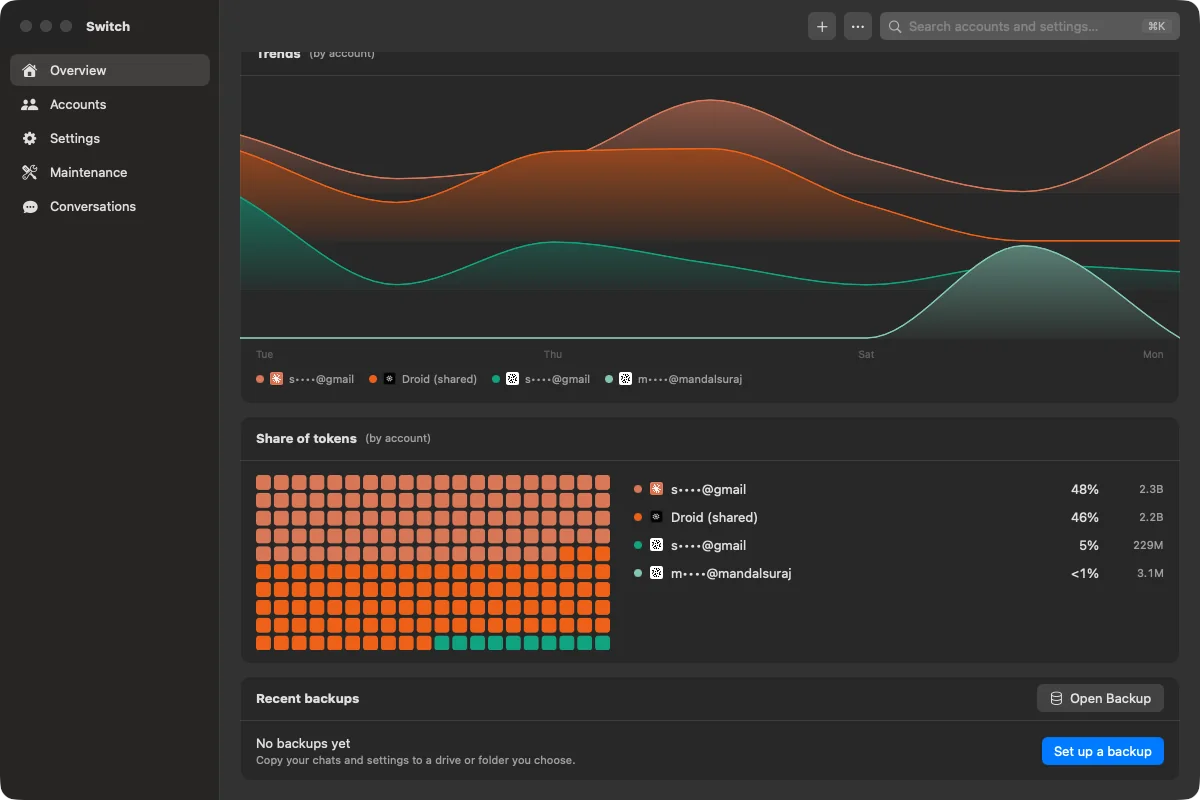
Tokens per day, a year of activity, trends per account, model, and project, and an estimated API cost. Search every past conversation too.
Hide email addresses, or turn on Privacy mode to show every account under a stable made-up name. Safe for screen sharing and recordings.
Works with your tools
16 command-line tools switch by swapping only their login. About 80 API and plan providers switch the saved key or session.
Plus Gemini CLI, GitHub Copilot, Droid, DeepSeek, Mistral, z.ai, AWS Bedrock, Vertex AI, and more. Not in this list? See every supported tool.
Terminal
The terminal interface uses the same account store and switching engine as the Mac app. Script it, or stop an agent before a window runs out.
npx --yes @smdl/switch
switch usage --json
❯
❯
Safe by design
A new sign-in runs in a private temporary home. The login you use now is never touched.
Before every switch, the old login is saved and the replaced bytes are backed up.
Switch never reads the macOS Keychain or browser cookie stores.
MIT licensed, signed, and notarized by Apple. Read every line on GitHub.
Free and open source. Requires macOS 14 or later on Apple Silicon.
or run npx --yes @smdl/switch in a terminal